We’re all about delivering the best for our guests, so we’ve streamlined the way you log in to the GYG app for an even smoother experience.
To improve account security and deliver a seamless log in process, we need you to update your GYG App account with your mobile number.
Soon you will be unable to log in to the GYG App using your Facebook account and will need to use your mobile number to log in.
How to update your MOBILE number on the gyg app
Please follow the steps below to add your mobile number in the app so you can continue to order on the app.
Existing GYG App Users
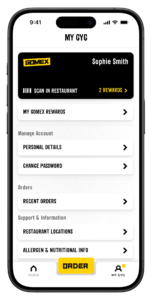
1. Click on the ‘My GYG’ in the bottom right hand corner and then click on ‘Personal Details’.
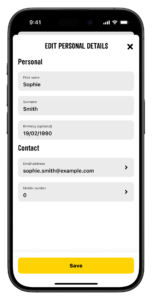
2. Update your mobile phone number.
3. Verify your mobile phone number with the given code.
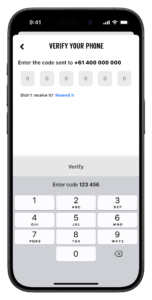
That’s it, you’re all set!
New GYG App Users
Follow the prompts upon sign up and input your mobile phone number to start using the GYG App!